
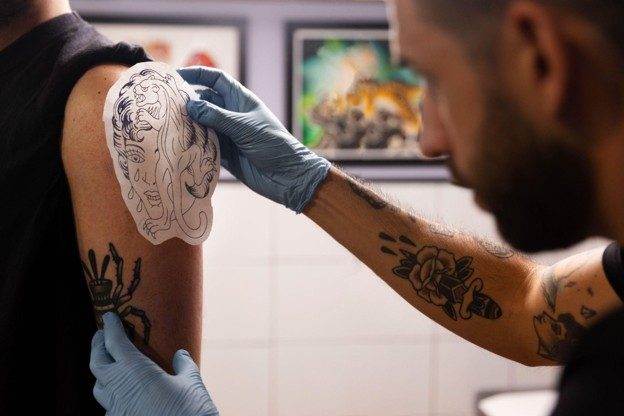
A reliable tattoo stencil machine bluetooth workflow can help artists manage late design revisions without compromising preparation, placement, or client communication. Changes to lettering, proportions, line weight, or composition can happen even after a design has been prepared for transfer. The challenge is not simply printing a revised image; it is ensuring the correct version reaches the stencil stage and is checked before the tattoo begins.
A digital-to-stencil process works best when each step has a clear purpose. Artists need to manage design files, confirm device connections, select compatible materials, and review the printed result. Establishing these habits can reduce avoidable reprints and help keep client expectations aligned with the final design.
Why Last-Minute Design Changes Require a Structured Workflow
Design revisions can affect more than the appearance of the artwork. A small adjustment to lettering may change spacing, while resizing an image can affect the visibility of fine details. Changes to placement or orientation may also require a fresh stencil rather than a simple reprint.
A tattoo stencil machine bluetooth setup may support a digital workflow, but wireless connectivity alone does not guarantee that the right file is printed or that the resulting stencil is ready for use. Artists still need a process for checking revisions and verifying output.
Common causes of avoidable stencil rework include:
- Unclear file versions: Several similar files may exist, making it difficult to identify the approved design.
- Unconfirmed client changes: An artist may prepare a revised stencil before the client has approved the final layout.
- Incorrect scaling: A design may print at an unsuitable size or with proportions that differ from the intended placement.
- Connection interruptions: A transfer or print job may not complete as expected if the device connection is unstable.
- Skipped print checks: A stencil may contain missing lines, unexpected darkness, or orientation problems that go unnoticed until placement.
Addressing these issues before printing helps artists keep revisions organized and avoid treating every change as an isolated technical problem.
Establish a Clear Design Approval and File-Version Process
The first step in an adaptable workflow is identifying the approved design. Before sending a file to a tattoo stencil machine bluetooth device, artists should confirm that the artwork reflects the latest agreed-upon changes.
A simple version-control process can prevent confusion:
- Save the initial artwork and revised versions separately.
- Use descriptive filenames that identify the design and revision, rather than relying on names such as final or final-new.
- Keep the approved version in a clearly designated folder.
- Confirm changes to size, orientation, lettering, or placement with the client before printing.
- Reopen the selected file and inspect it at the intended dimensions before sending the job.
This process is particularly useful when several revisions occur during a consultation. It creates a clear distinction between artwork that is still being edited and the version that is ready for transfer.
Artists should also avoid assuming that the most recently modified file is necessarily the approved one. The final selection should reflect the client’s confirmed preferences and the artist’s technical review.
Check Compatibility Before Using a Tattoo Stencil Machine Bluetooth Setup
Connectivity and device compatibility are separate considerations. A printer may support a particular connection method without supporting every operating system, application, or workflow in the same way. Before relying on a tattoo stencil machine bluetooth connection, artists should verify the specifications for their exact printer model.
S8’s product information describes the 8 Series Wireless model in connection with Bluetooth and AirPrint, while the product listing also includes USB-related wording. Because these details may refer to different configurations or components, artists should confirm the connection options and included equipment for the specific model they intend to use.
Before a time-sensitive print, check:
- Whether the printer supports the artist’s computer, tablet, or phone.
- Which connection methods are available on the exact model.
- Whether the required application or driver is installed and up to date.
- Whether the printer is paired or connected successfully.
- Whether the correct printer is selected before the job is sent.
- Whether the paper type and loading orientation match the device instructions.
A tattoo stencil machine bluetooth workflow should be tested before a client appointment whenever possible. Confirming these details in advance reduces the risk of discovering a compatibility problem during a revision.
Inspect the Printed Stencil Before Skin Placement
A successful print command does not necessarily mean the stencil is ready to use. Artists should examine the output against the approved design before preparing to transfer it to the skin.
A consistent inspection routine can include:
- Design accuracy: Confirm that the printed artwork matches the approved version.
- Dimensions: Check that the stencil has the intended size and proportions.
- Line clarity: Look for missing sections, streaks, or details that have become difficult to distinguish.
- Orientation: Verify that the design is facing the correct direction for the intended placement.
- Completeness: Ensure that all required elements have printed and that no part of the image has been unexpectedly cropped.
If the result is unsuitable, review the source file, print settings, paper loading, and device instructions before producing another copy. S8’s stencil-printer troubleshooting resources address issues such as dark images, streaked lines, and incorrect orientation, making them relevant references when diagnosing output problems.
This inspection is also a practical quality-control measure. It helps separate a design problem from a printing problem before either one affects the transfer process.
Build a Backup Plan for Printing Interruptions
Even a well-prepared tattoo stencil machine bluetooth setup can encounter connection or printing issues. A backup process gives artists a way to respond without rushing through checks or using an unverified stencil.
A practical plan may include keeping the approved artwork accessible, confirming that essential cables or power accessories are available when supported by the model, and understanding the manufacturer’s recommended troubleshooting steps. Artists should also know which alternative connection methods their specific printer supports rather than assuming that Bluetooth, AirPrint, and USB are interchangeable.
The U.S. Food and Drug Administration provides information about tattoos, permanent makeup, and related safety considerations through its tattoo and permanent makeup guidelines. Although printer troubleshooting is a separate technical concern, reliable preparation supports a more deliberate workflow in which artists can review their materials and procedures instead of rushing into the next step.
A backup plan should never replace inspection. If the printed stencil does not match the approved design or cannot be checked adequately, resolve the issue before proceeding.
Make Revision Management Part of the Studio Routine
A repeatable process makes late changes easier to manage because artists do not have to decide what to check from scratch every time a client requests an adjustment. A tattoo stencil machine bluetooth workflow becomes more dependable when file management, device checks, and print inspection are treated as connected steps rather than separate tasks.
A short pre-print checklist can help:
- Confirm the latest client-approved artwork.
- Verify dimensions, orientation, and required design details.
- Check the printer’s connection and compatibility.
- Confirm the correct stencil paper and loading method.
- Inspect the printed result before transfer.
- Save the approved file and note any relevant settings for future reference.
These steps do not eliminate every technical issue or design revision. They provide a consistent way to identify problems earlier, reduce unnecessary reprints, and protect the time needed for careful client consultation and preparation.
Ultimately, a tattoo stencil machine bluetooth device is one component of a broader studio workflow. The quality of the result also depends on file control, compatibility checks, material handling, and the artist’s judgment. When those elements work together, last-minute changes become easier to manage without sacrificing the attention required before a tattoo begins.